Hippo is a personal CRM built for Apple platforms. Keep notes, events, and to-dos for the friends, family, and colleagues you care about — all stored on your device. No account. No cloud server. No Contacts permission required.
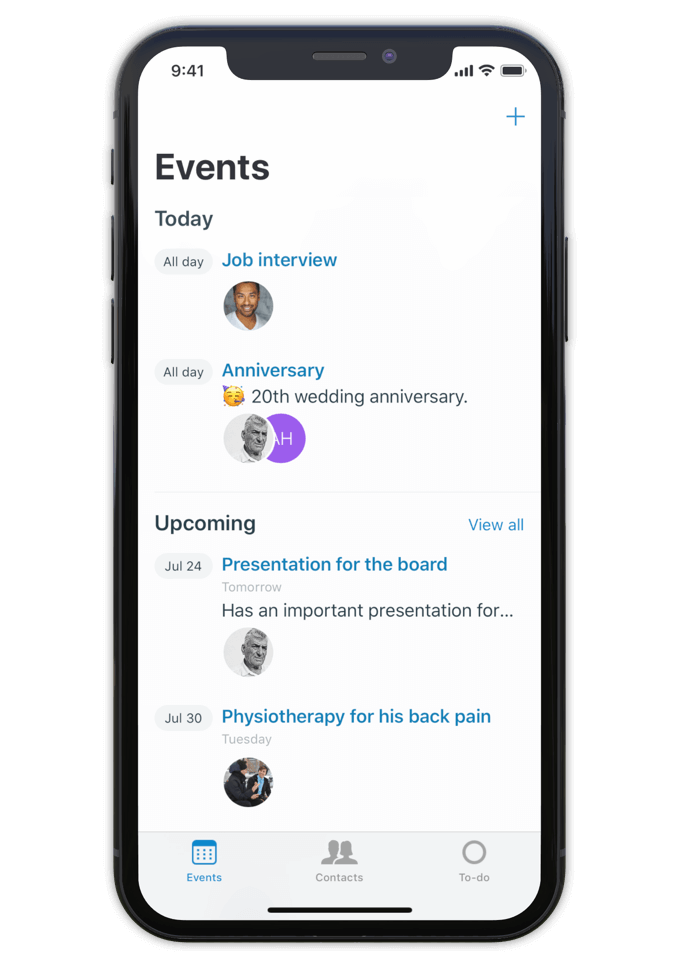
Hippo is a personal CRM for iPhone, iPad, and Mac. A personal CRM helps you keep track of the people in your life the way a sales CRM helps a salesperson track leads — but focused on the relationships that actually matter to you. Friends, family, mentors, colleagues, the people you want to stay close to.
Unlike most personal CRMs, Hippo stores everything on your device. There’s no account to sign up for, no server holding your contacts, and access to your iOS Contacts list is never required (it’s optional, and granted contacts still stay on-device). Optional sync runs through your own private iCloud Drive — never through Hippo.
Hippo is built for people who want to be more attentive without trading their privacy for the privilege.
Make notes, keep track of events and store to-dos for all your contacts.
So next time you meet, a quick glance at the person's profile in Hippo is all you need to remember the details.
Being attentive doesn’t have to be a challenge anymore.
Hippo is your personal reminder.

Use notes to quickly jot down things you learned about your contacts. Like names of kids, new jobs, a promotion, holiday plans, or gift ideas.
Create events for face to face meetings or important life events.
Get reminded when the event is happening so you can ask about it.
Remember the questions you want to ask the next time you meet.
Hippo is the personal CRM that doesn’t want your data.

Monica is a powerful open-source personal CRM, but it’s web-based and requires either a paid hosted plan or self-hosting your own server. Monica’s recent v5 update has shifted the product toward life journaling and modular vaults. If you want a focused personal CRM that runs natively on iPhone, iPad, and Mac with no setup, Hippo is the closer fit.
Dex is a strong choice if your relationships are heavily LinkedIn-driven and you want cross-platform sync via a Dex account. Hippo runs natively on Apple platforms (iPhone, iPad, and Mac) and is built around on-device privacy — your contact data never leaves your device unless you choose to sync via iCloud.
Clay enriches your contacts with public data from across the web. Hippo intentionally doesn’t do this. If you want enrichment, Clay is the right tool. If you want your data to stay local and untouched, Hippo is.
Hippo offers a one-time lifetime purchase option (uncommon in the category) and is the only one that works without ever requesting your iOS Contacts list.

Hi 👋, I’m Roel
I have been struggling with my memory all the time, at work and at home. I used to forget children’s names, someone's job, birthdays, anniversaries and other important life events. At work I couldn’t remember when or how a decision was made.
This made me insecure and unhappy. That is why I built Hippo.
With the Hippo app, I can remember all the important things about the persons I care for. A quick note usually does the job. It is simple and effective … and has changed my life! Hippo has helped me to become a better friend, partner and colleague.
Hippo is free to try for 1 month. After the trial, it’s $14.99 per year or $29.99 as a one-time lifetime purchase.
To view the pricing in your currency, see Hippo in the App Store.

Free to try for one month.
In the admin panel, navigate to the or Software Upgrade section. Click Browse or Choose File . Select the official firmware file you downloaded. Click Upgrade or Apply . Step 3: Wait for the Reboot Do not turn off the router. Do not unplug the Ethernet cable.
: Forums like OpenWrt or specialized networking groups on Facebook/Reddit sometimes share firmware backups, but these are high-risk and may not be compatible with your specific hardware revision. Update Process (General Guide)
Note: Standard user accounts cannot flash firmware. You need the "telecomadmin" or full administrator login. Step 3: Backup Your Settings Navigate to > Device Management > Backup .
Before searching for a firmware download link, you must gather your device's specific hardware details. Flashing the wrong firmware version will permanently brick your router.
Open a web browser and enter the default IP address: 192.168.1.1 (or 192.168.1.254 , depending on your ISP settings).
Enter your administrator credentials. Note that standard user accounts ( user / user ) cannot perform updates. You need the admin account (often admin / admin or ISP-specific admin keys).
Updating the firmware of your Fiberhome HG6243C device is essential to:
: Improving Wi-Fi stability and signal reliability. Where to Download Firmware
Many users search for direct firmware download links hoping to upgrade their home routers. However, for end-users. Because the
Log into your router dashboard (usually at 192.168.1.1 or 192.168.1.254 ) and navigate to > Device Information to copy your current Software Version . Step 2: Where to Find the Download Link
: Improves Wi-Fi stability, reduces latency, and optimizes data routing.
Your Internet Service Provider manages the configuration profile of your HG6243C. Contact your ISP’s technical support department.
Peak Mirror Co. All rights reserved. © 2026